7 Mistakes That Invite LSASS Credential Theft and How to Stop Them
Default Windows settings leave the memory of the security process readable to standard users, creating an open door for attackers to steal active session tokens.

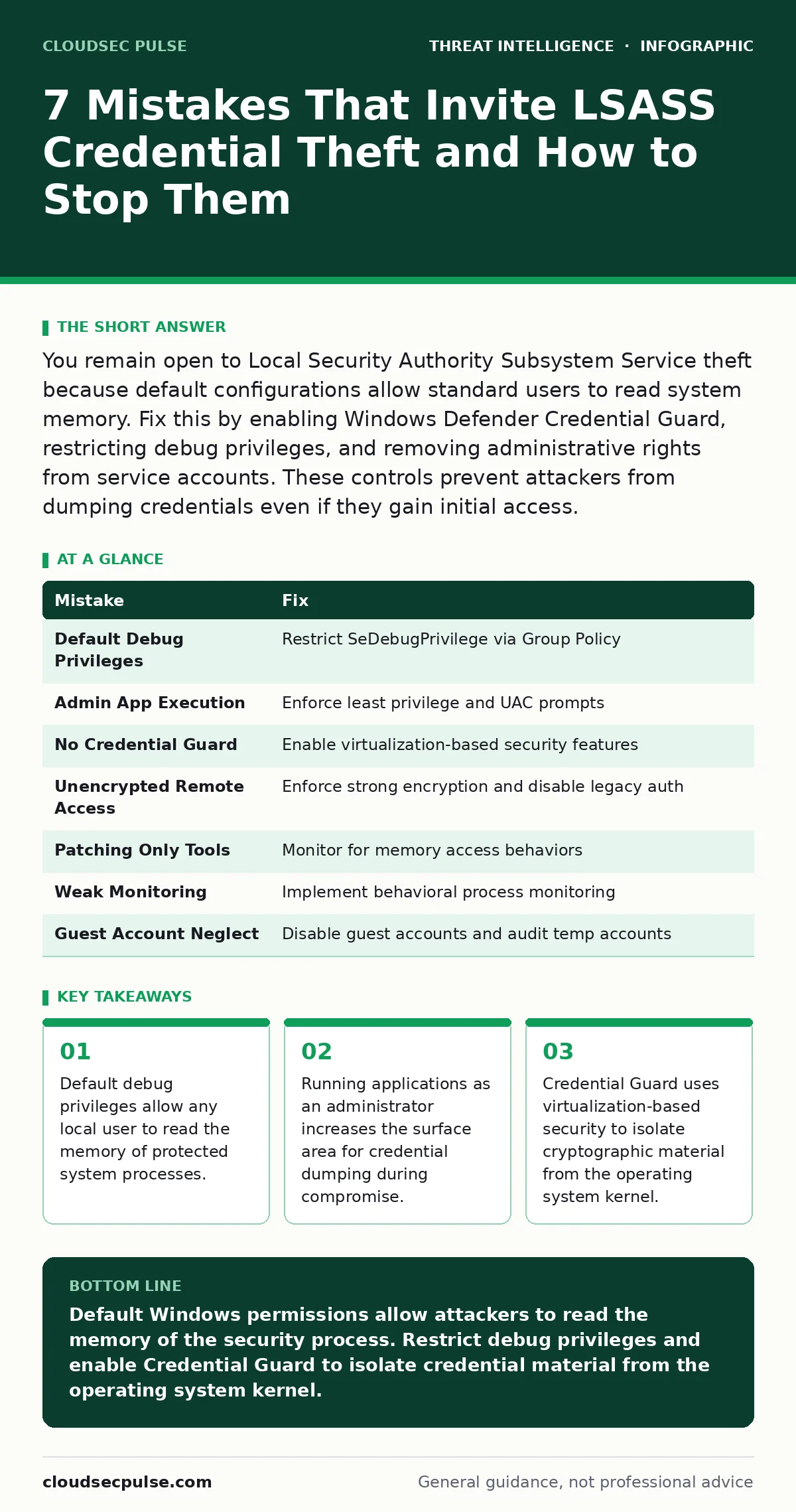
You remain open to Local Security Authority Subsystem Service theft because default configurations allow standard users to read system memory. Fix this by enabling Windows Defender Credential Guard, restricting debug privileges, and removing administrative rights from service accounts. These controls prevent attackers from dumping credentials even if they gain initial access.
Mistake 1: Leaving Default Debug Privileges Enabled
Windows assigns the SeDebugPrivilege right to local administrators by default. This permission allows a process to read, write, and modify the memory of any other process on the system. Attackers exploit this right to attach a debugger to the Local Security Authority Subsystem Service. The LSASS process stores plaintext credentials and ticket caches in its memory space. Once attached, an attacker can extract these secrets without needing the password itself.
Why it hurts:
The consequence of leaving this privilege enabled is immediate credential compromise. An attacker who gains any standard user account on your machine can escalate their access. They do not need a vulnerability in the application. They simply use the built-in operating system permissions. This turns every local user account into a potential backdoor for full domain control.
The fix:
Restrict the SeDebugPrivilege right using Group Policy or local security policies. Remove this right from the Administrators group and assign it only to specific service accounts that truly require it. Use the "Debug programs" policy setting in the Local Security Policy editor. This prevents standard users and most malware from reading the memory of protected processes.
Mistake 2: Running Applications with Unnecessary Admin Rights
Users often run daily applications like web browsers or email clients with administrator privileges. This practice persists because some legacy software demands it or because users find it convenient. When an application runs with elevated rights, any exploit within that application also runs with elevated rights. This gives malware direct access to the higher-privilege token associated with the user session.
Why it hurts:
The consequence is a lowered barrier for credential theft. If a user clicks a malicious link in their browser, the resulting malware inherits administrator rights. It can immediately target the LSASS process without performing further privilege escalation steps. This accelerates the attack timeline and reduces the chance of detection.
The fix:
Enforce the principle of least privilege. Configure user accounts to operate with standard user rights by default. Use User Account Control to prompt for elevation only when necessary. Deploy application whitelisting to ensure only approved software runs. This limits the damage scope of any exploit to the standard user context.
Mistake 3: Ignoring Virtualization-Based Security Features
Modern Windows versions include Credential Guard, a feature that uses virtualization-based security. This technology isolates the cryptographic operations and credential storage from the main operating system kernel. Many organizations disable this feature during deployment to save hardware resources or due to compatibility concerns with legacy antivirus software. This leaves the credential material exposed in the standard memory space of the host OS.
Why it hurts:
The consequence is the loss of the primary defense-in-depth layer. Without Credential Guard, the LSASS process remains a single point of failure. Attackers can use well-known techniques to dump the memory and extract NTLM hashes or Kerberos tickets. This makes the initial compromise much more valuable to the adversary.
The fix:
Enable Windows Defender Credential Guard on all eligible endpoints. Verify that your hardware supports virtualization-based security features. Test compatibility with existing security tools before widespread deployment. This ensures that even if an attacker gains kernel access, they cannot easily retrieve the stored credentials.
See our guide on living-off-the-land attacks to understand how attackers use built-in tools to bypass these defenses.
Mistake 4: Allowing Remote Service Access Without Encryption
Some internal services or remote management tools transmit credentials in plaintext or weak encryption. Attackers who gain network access can intercept these transmissions. They then use the captured credentials to authenticate to other systems. This lateral movement allows them to reach servers hosting the LSASS process with higher-value accounts.
Why it hurts:
The consequence is the bypass of endpoint protections entirely. If an attacker obtains valid credentials over the network, they do not need to touch the LSASS process on the initial machine. They can directly authenticate to domain controllers or file servers. This makes endpoint detection less effective against the breach.
The fix:
Enforce strong encryption protocols for all remote management and service communications. Disable legacy authentication methods like NTLMv1. Implement network segmentation to limit the visibility of sensitive services. This reduces the attack surface and prevents credential reuse across the network.
Mistake 5: Neglecting to Patch Known Dumping Tools
Attackers frequently use well-known tools like Mimikatz to dump credentials from LSASS. These tools are open-source and widely available. Many organizations focus on blocking the tool itself rather than the underlying vulnerability. If the system allows the action, the tool is just a convenience. The real vulnerability is the permission to read the memory.
Why it hurts:
The consequence is a false sense of security. Blocking a specific tool name does not stop an attacker from writing a custom script. Custom scripts can perform the same memory dump operation. This cat-and-mouse game is unsustainable. You must close the underlying capability, not just the specific exploit.
The fix:
Focus on behavioral detection rather than signature-based blocking. Monitor for processes attaching to LSASS or reading its memory. Use application control policies to prevent unknown executables from running. This stops both known tools and custom scripts from performing credential theft.
See also: Prevent Linux Kernel Privilege Escalation: Top Defenses
Mistake 6: Failing to Monitor for Anomalous Process Activity
Standard monitoring often looks for known malicious file names. This approach misses novel attacks or renamed tools. Attackers frequently rename their tools to look like legitimate system processes. They also use process injection to hide their activity within trusted processes. This makes it difficult to distinguish between normal system behavior and credential theft.
Why it hurts:
The consequence is delayed detection. By the time you notice the breach, the attacker has likely moved laterally. They have already extracted credentials from multiple systems. The window for containment closes quickly. You lose the ability to isolate the affected machine before further damage occurs.
The fix:
Implement behavioral monitoring for process creation and parent-child relationships. Alert on any process that attempts to interact with the LSASS process. Use endpoint detection and response solutions that analyze execution context. This helps identify suspicious activity even when the file name is benign.
Mistake 7: Overlooking Guest and Temporary Accounts
Guest accounts and temporary service accounts often have weak passwords or no passwords. Attackers scan for these accounts to gain an initial foothold. Once inside, they use the account to access shared resources. This provides a path to systems where LSASS contains higher-privilege credentials.
Why it hurts:
The consequence is an easy entry point. These accounts are often overlooked in security audits. They provide a low-risk way for attackers to enter the network. From there, they can perform privilege escalation attacks to reach the LSASS process. This turns a minor misconfiguration into a major breach.
The fix:
Disable guest accounts on all endpoints and servers. Regularly audit and remove temporary service accounts. Enforce strong password policies for all accounts, including service accounts. This removes the low-hanging fruit that attackers use to start their intrusion.
| Mistake | Fix |
|---|---|
| Default Debug Privileges | Restrict SeDebugPrivilege via Group Policy |
| Admin App Execution | Enforce least privilege and UAC prompts |
| No Credential Guard | Enable virtualization-based security features |
| Unencrypted Remote Access | Enforce strong encryption and disable legacy auth |
| Patching Only Tools | Monitor for memory access behaviors |
| Weak Monitoring | Implement behavioral process monitoring |
| Guest Account Neglect | Disable guest accounts and audit temp accounts |
Key takeaways
- Default debug privileges allow any local user to read the memory of protected system processes.
- Running applications as an administrator increases the surface area for credential dumping during compromise.
- Credential Guard uses virtualization-based security to isolate cryptographic material from the operating system kernel.
Default Windows permissions allow attackers to read the memory of the security process. Restrict debug privileges and enable Credential Guard to isolate credential material from the operating system kernel.
Frequently asked questions
Does antivirus software stop LSASS dumping?
Standard antivirus focuses on file signatures and may miss custom scripts or built-in system tools used for memory dumping. Behavioral monitoring is more effective for detecting the actual theft action.
Can I prevent this without virtualization-based security?
You can reduce risk by restricting debug privileges and enforcing least privilege, but Credential Guard provides the strongest isolation. Without it, the memory remains accessible to processes with the right permissions.
How do I know if my accounts are compromised?
Monitor for unusual login times, locations, or resource access patterns. Look for authentication events from accounts that should not be active. Behavioral anomalies often indicate stolen credentials in use.
Is remote desktop vulnerable to this?
Remote Desktop Protocol itself is secure, but if an attacker gains access via RDP, they can target LSASS on the remote machine. Ensure RDP is restricted and credentials are managed securely.
How this guide was produced: written by the CloudSec Pulse editorial team with AI assistance, checked against the public references listed below, and reviewed when the facts change. See our editorial policy or report an error.