CSAF Security Advisories: Automate Patching Decisions and Reduce Risk
CSAF advisories convert vendor noise into machine-readable data, allowing systems to prioritize fixes based on actual exposure rather than fear.
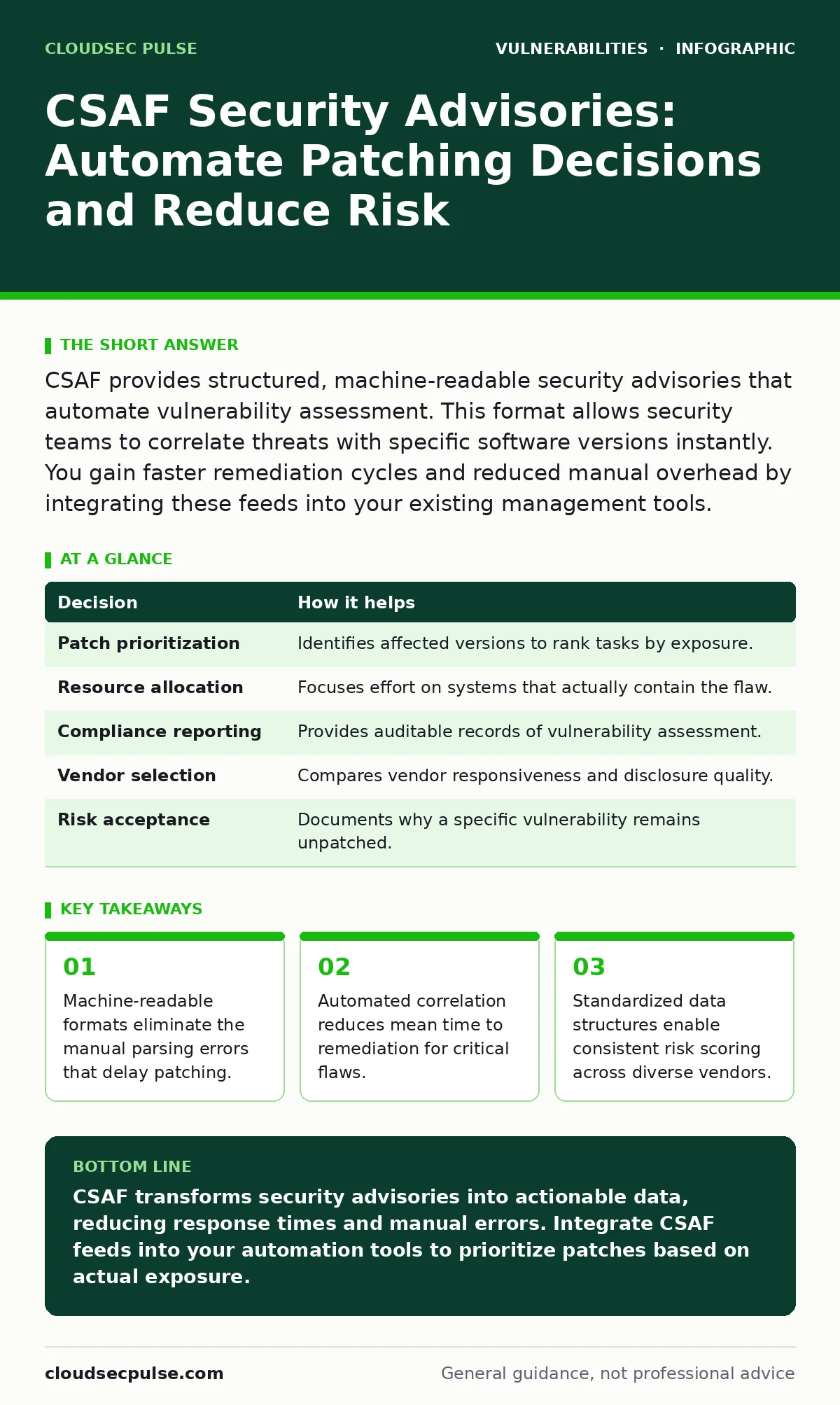
CSAF provides structured, machine-readable security advisories that automate vulnerability assessment. This format allows security teams to correlate threats with specific software versions instantly. You gain faster remediation cycles and reduced manual overhead by integrating these feeds into your existing management tools.
The Problem With Unstructured Security Notices
Vendor security notices often arrive as unstructured text, PDFs, or HTML pages. These formats require human interpretation to determine which products are affected and what actions are required. This manual process introduces delays and errors. A security analyst must read each notice, identify the vulnerable component, check if that component exists in the environment, and determine the severity.
This workflow breaks down when multiple vendors release updates simultaneously. The cognitive load increases, leading to missed vulnerabilities or delayed patches. Unstructured data cannot be processed by automation tools efficiently. This creates a bottleneck where human speed limits security response times.
What CSAF Actually Is
Common Security Advisory Framework (CSAF) is a standard for publishing security advisories in a machine-readable format. It uses JSON or XML structures to define vulnerabilities, affected products, and remediation steps. This standard allows software systems to parse and interpret security data without human intervention. CSAF documents include specific identifiers for vulnerabilities, such as CVE numbers, and detailed information about affected software versions. The structure ensures that all necessary context is present and consistent. This consistency enables different tools to process the same data in the same way. It removes ambiguity from security communications.
Decisions Informed By Structured Data
CSAF advisories inform critical operational decisions by providing precise context. They help determine which systems require immediate attention and which can wait. The data clarifies the relationship between a vulnerability and the specific software configuration. This precision prevents unnecessary patching of unaffected systems. It also helps prioritize resources based on actual exposure rather than perceived severity. Teams can align remediation efforts with business continuity requirements. The structured data supports risk-based decision making. It transforms vague warnings into actionable intelligence.
| Decision | How it helps |
|---|---|
| Patch prioritization | Identifies affected versions to rank tasks by exposure. |
| Resource allocation | Focuses effort on systems that actually contain the flaw. |
| Compliance reporting | Provides auditable records of vulnerability assessment. |
| Vendor selection | Compares vendor responsiveness and disclosure quality. |
| Risk acceptance | Documents why a specific vulnerability remains unpatched. |
What Goes Wrong Without Automation
Without machine-readable advisories, security teams rely on manual correlation. This approach is prone to human error and fatigue. Analysts may miss subtle version differences or misinterpret severity ratings. Delays in processing notices allow attackers to exploit known vulnerabilities before patches are applied. This window of exposure is particularly dangerous for wormable vulnerabilities that spread rapidly across networks. Manual processes also fail to scale. As the number of systems and vendors increases, the workload grows exponentially. This leads to alert fatigue and ignored warnings. The lack of automation creates a fragile security posture.
How Teams Integrate CSAF Into Workflows
Teams integrate CSAF feeds into their security orchestration and automation platforms. These platforms pull data from vendor endpoints and parse the JSON or XML structures. The system then correlates the advisory data with the organization's IT asset inventory. This correlation identifies exactly which devices are vulnerable. The platform can automatically generate tickets, schedule patches, or block traffic to vulnerable services. This integration reduces the time between disclosure and remediation. It also ensures that every vulnerable system is accounted for. The process becomes repeatable and auditable.
See also: Vulnerability Prioritization: Fix What Actually Breaks Your Business · National Vulnerability Database Explained: How NVD Works for You
Edge Cases And Hidden Costs
CSAF adoption is not without challenges. Some vendors may not support the standard or may provide incomplete data. Teams must verify the accuracy of the information before acting on it. There is also a risk of over-automation. Blindly applying patches based on automated decisions can cause system instability. Teams must maintain a balance between automation and human oversight. Another hidden cost is the need for skilled personnel to manage the integration. Configuring parsers and correlation rules requires technical expertise. Organizations must invest in training and tooling to realize the benefits.
Comparing CSAF To Other Standards
CSAF complements other security standards like CVE and CVSS. CVE provides unique identifiers for vulnerabilities, while CVSS provides severity scores. CSAF provides the context that links these identifiers to specific products. This combination allows for a more complete understanding of risk. However, CSAF is not a replacement for exposure management practices. It focuses on known vulnerabilities rather than unknown exposures. Teams should use CSAF as part of a broader security strategy. It addresses the remediation phase but not the detection phase.
The Role Of Logging And Permissions
Effective use of CSAF requires accurate system data. If your logging library vulnerabilities are not tracked, you may miss critical updates. Similarly, insecure file permissions can expose systems even after patches are applied. CSAF helps identify the need for patches, but it does not fix configuration errors. Teams must ensure that their systems are properly configured to receive and apply updates. This includes verifying that services have the necessary permissions to download and install patches. Without proper permissions, automated remediation fails.
Long-Term Benefits For Security Postures
Adopting CSAF leads to a more resilient security posture over time. It reduces the reliance on manual processes and human memory. The consistent data structure allows for better trend analysis and reporting. Organizations can identify patterns in vendor disclosure practices and adjust their strategies accordingly. It also facilitates collaboration with other organizations by providing a common language for security data. This shared understanding improves the overall security ecosystem. The standard evolves to include more detailed information, enhancing its utility.
Key takeaways
- Machine-readable formats eliminate the manual parsing errors that delay patching.
- Automated correlation reduces mean time to remediation for critical flaws.
- Standardized data structures enable consistent risk scoring across diverse vendors.
CSAF transforms security advisories into actionable data, reducing response times and manual errors. Integrate CSAF feeds into your automation tools to prioritize patches based on actual exposure.
Frequently asked questions
Does CSAF replace CVE identifiers?
No, CSAF uses CVE identifiers to reference specific vulnerabilities. It adds context about affected products and remediation steps.
Can small teams use CSAF effectively?
Yes, small teams benefit most from the automation that CSAF enables. It reduces the manual workload associated with vulnerability management.
What if a vendor does not support CSAF?
You can manually create CSAF documents from vendor notices or wait for third-party providers to publish the data. Some platforms can parse non-standard formats.
Is CSAF limited to software vulnerabilities?
CSAF primarily addresses software vulnerabilities. It can also include information about hardware flaws and configuration issues if the vendor provides it.
How this guide was produced: written by the CloudSec Pulse editorial team with AI assistance, checked against the public references listed below, and reviewed when the facts change. See our editorial policy or report an error.